AI Coaching for
Live Coding Interviews
Voxtera AI helps you handle live coding, debugging, system design, and technical interview questions with screen-aware guidance. Capture the question, get structured help, and explain your approach with confidence.
- Supports live coding and system design interviews
- Capture on-screen questions with one key
- Get help explaining approach, edge cases, and complexity
3 free live interview sessions · No credit card required
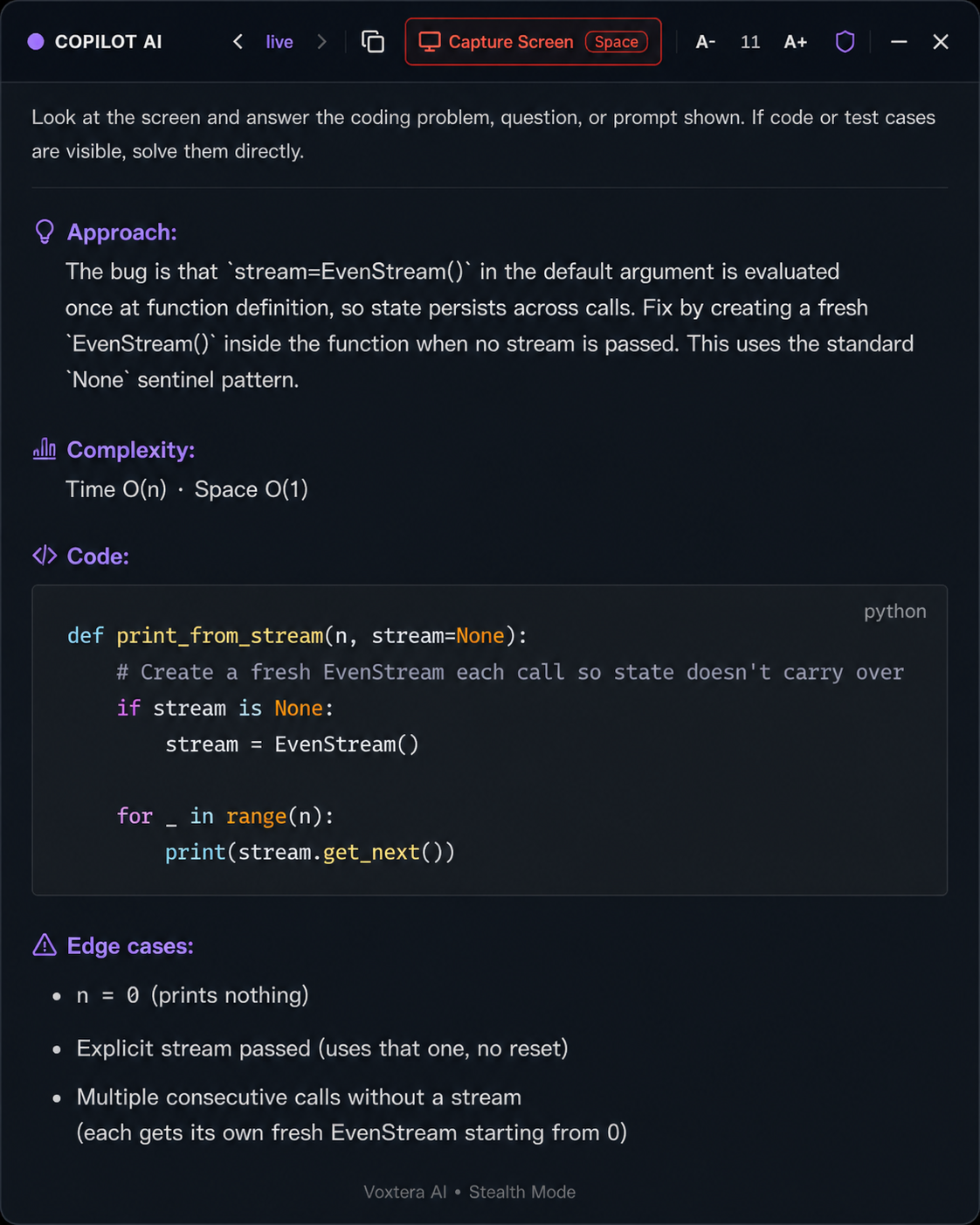
Capture coding prompts, system design questions, and debugging tasks, then get structured guidance in seconds.
Built for Live Technical Interviews
Whether the question appears in a coding editor, on a shared screen, in a prompt, or as a system design discussion, Voxtera helps you organize your answer and communicate clearly.
Live Coding
Practice solving coding prompts while explaining your thinking, edge cases, and time and space complexity.
System Design
Get help organizing tradeoffs, architecture choices, APIs, databases, scaling, caching, and reliability.
Debugging Questions
Capture the bug or code snippet on screen and get a structured explanation of what is wrong and how to fix it.
Technical Communication
Practice explaining your approach clearly and confidently — not just writing the code, but walking through it.
Edge Cases
Get reminders for input limits, empty inputs, duplicates, invalid states, and performance risks before you submit.
Complexity Analysis
Prepare clear time and space complexity explanations for your solution so you're never caught off guard.
How the Live Coding Copilot Works
Use Voxtera as a private desktop workspace during technical interview preparation and live coding sessions.
Capture Screen
Automatically or manually captures the coding question, prompt, diagram, or system design problem visible on your screen.
Space shortcut
Press Space to manually capture the screen when a question appears or when you want fresh guidance on a new prompt.
Live mode
Keeps the assistant ready for real-time coding, debugging, and system design prompts throughout your session.
Copy button
Copy the AI guidance or code response so you can save, review, or reference it in your notes.
Font controls (A- / A+)
Increase or decrease response text size so answers are easy to read during a session.
Privacy shield
Keeps your private desktop workspace focused on your screen and your preparation.
Close / minimize
Quickly close or minimize the panel when you do not need guidance.
Get Structured Help for Technical Prompts
Voxtera handles the full range of questions that come up in modern technical interviews.
- Coding problems
- Debugging questions
- System design prompts
- API design questions
- Database design questions
- Scalability and tradeoffs
- Complexity analysis
- Edge cases
- Code explanation
- Follow-up questions
System Design Support
For system design interviews, Voxtera helps you organize your answer before you speak. Break down requirements, ask clarifying questions, choose components, explain tradeoffs, and prepare a clear architecture flow.
- Clarifying questions
- Functional and non-functional requirements
- API and data model guidance
- Scaling, caching, queues, and databases
- Tradeoffs and follow-up questions
What the AI coaches in real time
Think-Aloud Coaching
Practice verbalizing your problem-solving process — the single most important skill interviewers actually evaluate.
Edge Case Identification
AI surfaces edge cases you may have missed and coaches you on a systematic approach to catching them every time.
Complexity Analysis
Practice discussing time and space complexity clearly and correctly — a frequent failure point in technical screens.
System Design Structure
Organize your system design answer: requirements, components, APIs, data models, scaling, and tradeoffs.
Debugging Guidance
Capture a code snippet or error on screen and get a structured explanation of the root cause and the fix.
Code Communication
Practice explaining what your code does as you write it — making your reasoning transparent to the interviewer.
FREE PLAN INCLUDES
- 3 free live interview sessions
- 5 free practice sessions
- No credit card required
Coding Interview FAQ
Voxtera AI is designed to help you prepare, organize your thinking, and communicate more clearly during technical interviews. Always follow the rules and expectations of your interview platform or employer.
Live Coding Interview Support — Start Today
Get screen-aware AI guidance for coding, debugging, system design, and technical communication. Your first three sessions are free.
Free plan available · No credit card needed · Cancel anytime